What is on a SitePlanToday plan

Every line on a sheet has a purpose. This page explains the Townhome Concept sheets, each layer, the title block and where the data comes from.

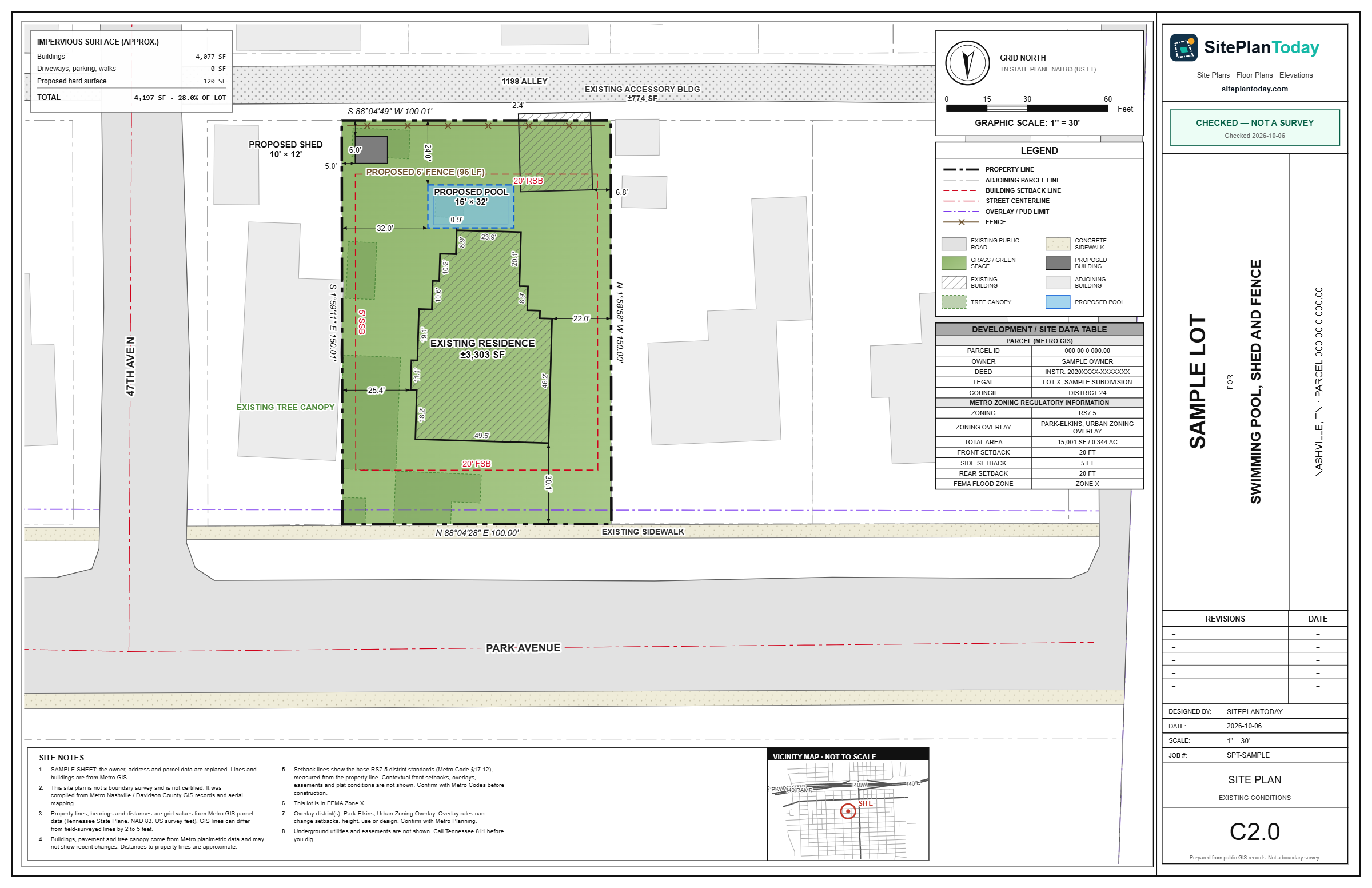
Sample site plan on an 11 by 17 sheet. It shows a residential lot with its property lines, buildings, setback lines, legend and title block.
Sample plan sheet11 x 17 sheet
Townhome Concept

The sheet set

A Townhome Concept order can have up to three sheets. Each sheet shows the same typical unit.

Site plan

The lot from above, with each unit, the garages or parking, the private drives and the setback lines. Existing buildings are marked to be removed. A site data table gives the zoning, the lot area, the density limit, the units shown, the units per acre, the building cover and the parking.

Floor plans

Each level of the typical unit, with room names and sizes. A garage unit has 3 levels. A unit without a garage has 2 levels. See the rooms.

Elevations

The front and the rear of the typical unit, with floor levels, the total height, the roof, the materials, the doors and the windows. See the details.

The sheets are concepts for planning. They are not a survey, and they are not certified or sealed.

Layers

Each layer, explained

The color on the left is the color of the layer on the plan. A townhome site plan shows each layer when the data exists for the lot. The gray labels apply to classic permit site plans, which we draw by request.

Townhome unitsTownhomeEach unit of the layout, with its size and its number.
Private drives and parkingTownhomeThe drive from the street or the alley, the driveway aprons and the surface spaces.
Property linesThe legal edges of the lot. Each side has a bearing (its compass direction) and a length in feet.
Lot areaThe total area inside the property lines, from the county parcel record.
Adjoining parcelsDetailedThe lots next to yours, with their addresses and parcel numbers, so a reviewer can see where the lot sits.
Streets and pavementThe road in front of the lot, its name, and the edge of the paved surface.
BuildingsThe house and other buildings, such as a garage or shed, drawn with a hatch and their outside sizes.
Driveways, parking and sidewalksStandard and DetailedHard surfaces on the lot, drawn so a reviewer can see access and paved area.
Tree canopyStandard and DetailedThe area covered by tree tops. Some permits and tree rules ask for it.
Distances to lot linesThe shortest distance from each building to each nearby lot line. Permit offices check these against the setbacks.
Zoning district and setback linesStandard and DetailedA setback is the minimum distance a building must stay from a lot line. We draw the base setback lines for the zoning district.
Overlay districts and PUDsDetailedAn overlay or planned unit development (PUD) can add rules for height, design or use. We show which ones touch the lot.
FEMA flood hazard zoneStandard and DetailedThe flood zone from the Federal Emergency Management Agency maps, including pending map changes where they exist.
Stormwater buffersDetailedAreas near water where building is limited, plus stormwater control measures such as rain gardens or detention areas.
Topographic contoursAdd-onLines that join points of equal ground height. They show slopes, high points and low points.
Proposed workYour projectWhat you plan to build: a pool, fence, shed, deck, addition, garage, ADU or driveway, with its size and distances.
North arrow, scale bar and legendThe tools a reader needs to measure the plan and understand each line and symbol.
Title blockParcel ID, owner, deed reference, zoning, council district, flood zone and setbacks, in one box on the sheet.
Title block

The facts about the lot, in one place

The title block is the box on the edge of the sheet. A reader looks at it first. It tells them which lot the plan shows and which rules apply. On a townhome site plan, the site data table is next to it.

Some facts, such as the council district and pending flood maps, come automatically only in Davidson County.

Parcel ID
The number the county uses for the lot in its tax and map records.
Owner
The owner of record, from the county assessor.
Deed
The book and page or instrument number of the recorded deed.
Zoning
The zoning district, for example RS7.5. The district sets what you can build and the setbacks.
Council district
The Metro Council district in Davidson County.
Flood zone
The FEMA flood zone, for example Zone X or Zone AE.
Setbacks
The front, side and rear setbacks for the zoning district.
Sheet facts
The date, the scale, the sheet size and a note that the plan is not a survey.
Data sources

Where the data comes from

In Davidson County, we load the data automatically from Metro Nashville public GIS services. GIS means geographic information system: the digital maps a county keeps of its parcels, roads and other features.

  • Parcels. Metro Nashville GIS parcel lines, addresses, owners and parcel IDs.
  • Building footprints. Metro building outlines, checked against aerial photos.
  • Pavement and streets. Metro pavement edges and street centerlines with street names.
  • Tree canopy. Metro tree canopy data.
  • Flood hazard areas. FEMA flood hazard areas as published by Metro Nashville, approved and pending.
  • Stormwater buffers. Metro stormwater buffers for streams, wetlands, ponds and floodways.
  • Zoning and overlays. Metro zoning districts, overlay districts and PUDs, with the rules from Metro Code Title 17.
  • Contours. 2-ft contour lines from public elevation data (add-on).
 

Outside Davidson County

The automatic townhome layout works only in Davidson County, because it uses Metro Nashville data. For a lot in another county, or for a classic permit site plan, send us a request. We then use the public GIS records of that county, recent aerial photos and any files you send.

Please note: our plans come from public records. They are not a boundary survey. They are not certified or sealed by an engineer or a surveyor. A townhome layout is a concept: a final design still needs a civil engineer, an architect and a review by Metro Nashville.

See how many townhomes fit on your lot.

Start with the address. You see the lot facts free before you pay.